µTorrent® Pro - Torrent App
- 4.8
- Rating
- 500.00K
- Installs
- $2.99
- Price

 Analysis by App-foxy
µTorrent® Pro - Torrent App is the kind of Android tool I judge less by its appearance than by how calmly it handles real network conditions. It belongs to the video players and editors category, although its practical role is broader: it helps manage torrent downloads on a phone or tablet, then lets me work with the resulting media in a more direct way than a conventional streaming app. I found it most useful when I already knew what I wanted to download and had a reliable connection available.
The app comes from bittorrent.com and costs $2.99. Its store summary highlights an ad-free experience and battery-saving behavior, but those promises only matter if the underlying workflow feels dependable. In my use, the strongest part of the package is the reduced distraction while choosing and supervising downloads. The weaker part is that torrenting remains dependent on the quality of the network, the availability of peers, available storage, and the way Android handles background activity. No paid upgrade can remove those practical limits.
How µTorrent Pro behaves when the network is doing the real work
The first thing I would explain to a friend is that this is not a magic download button. A torrent can begin quickly, crawl for a long time, or appear inactive depending on the swarm and the connection around it. That makes the app feel very different from a normal video service, where pressing play usually produces an immediate and predictable result. With this client, patience and observation are part of the experience.
You May Also Like

 Blood Strike: 2.5 Anniversary
Blood Strike’s Loadouts Turn Every Drop Into a Tactical Gamble
A close look at Blood Strike’s custom loadouts: how fast access to signature weapons reshapes its battle royale rhythm, rewards preparation, and narrows the gap between fights.

 Pandora - Music & Podcasts
Pandora’s Music Is Easy to Start, but Harder to Recover
Pandora’s strength is its low-effort path from a seed to a station. Its weak spot is how much confidence it asks you to place in connection, setup, and quiet recovery.

 8 Ball Pool
 Is Built on Rivalries, Rematches, and Routine
A close look at the rivalries, rematches, shared routines, and unanswered safety questions that turn a quick pool match into a persistent mobile community.

 Samsung Music
’s Quiet Strength Is Playing What You Already Own
Its reach comes less from spectacle than from dependable access to a personal library. That simplicity is both the app’s strongest retention engine and its ceiling.

 AccuWeather: Weather Radar
AccuWeather Review: A Quick, Clear Forecast for Everyday Decisions
For everyday plans, the best forecast is the one you can understand quickly. AccuWeather makes rain timing, radar, and local conditions easy to act on, with a few trade-offs.

 Hill Climb Racing
Why Hill Climb Racing Still Turns Crashes Into One More Run
A tiny car, a bumpy hill and one more upgrade: Hill Climb Racing keeps resurfacing because its simple chaos makes every near-miss feel personal.
More From Our News Desk



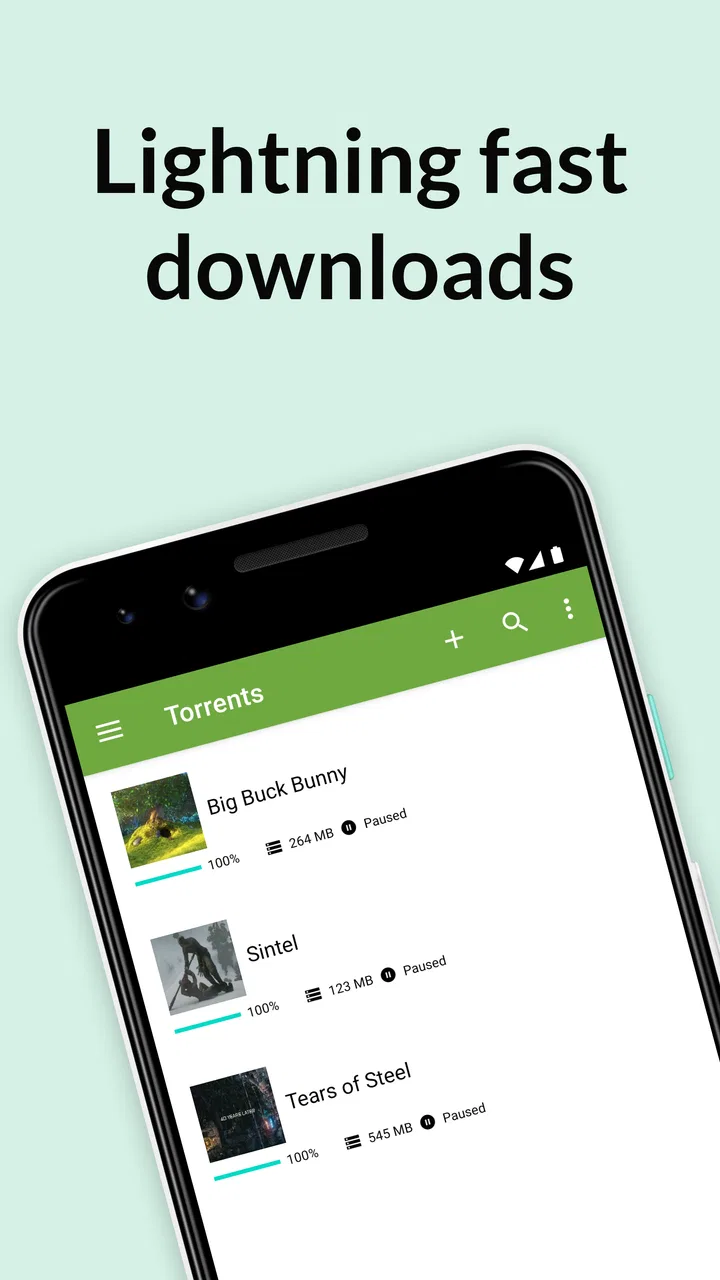
I like being able to start a transfer and then return to the list to see whether it is progressing. That simple habit is important because a slow torrent is not automatically a broken app. If the activity remains low, I first check whether the connection is stable, whether the selected torrent has active peers, and whether the device has enough free space. This avoids the common mistake of repeatedly restarting a download that is simply waiting for better availability.
The paid edition makes the interface easier to live with because advertising does not compete with the controls. That sounds minor, but a download manager is something I may open briefly several times rather than use in one long session. A clean screen makes it quicker to identify the active item, inspect its state, and leave again. The real advantage is less friction during repeated check-ins, not faster networking by itself.
For a realistic everyday example, imagine that I am preparing a long video for a train journey. I would add the torrent while connected to dependable Wi-Fi, confirm that the destination has enough room, and watch the first part of the transfer rather than assuming everything is fine. If progress looks healthy, I can leave the device alone and check later. If it stalls immediately, I would investigate the source or connection before wasting time and battery.
That workflow also shows why this app is not ideal for someone who expects instant entertainment. If the goal is to watch something immediately, a mainstream streaming service is usually the better choice. Streaming trades local preparation for convenience. µTorrent Pro makes more sense when I want control over a transfer and accept that the network may decide how long the process takes.
Choosing the right moment on a mobile connection
On a phone, timing matters more than it does on a desktop. I would avoid starting a large transfer casually while travelling or while relying on a limited mobile plan. Even when the app itself is efficient, the file being transferred can consume a meaningful amount of data. A sensible routine is to begin on Wi-Fi, check the download size before confirming, and avoid leaving mobile data enabled for the client unless I have deliberately accepted that cost.
The app’s battery-saving positioning is useful, but I would treat it as a reason to expect a gentler experience, not as permission to ignore power consumption. Network activity, screen use, and a device working on a large file can still affect battery life. I normally start a transfer with the display off, keep unnecessary apps closed if the phone is already under strain, and check the result later instead of constantly opening the client.
One less obvious trade-off is that the best location for a torrent workflow is often not the most convenient one. A phone has limited storage compared with a computer, and media files can fill it faster than expected. I would keep a buffer of free space rather than using every available gigabyte. When storage becomes tight, Android may become less comfortable overall, and the problem then extends beyond this particular app.
Another practical point is heat. A transfer that runs for a long time over a weak signal can make a phone work harder than a short download over a strong connection. If I notice the device becoming unusually warm, I would move to a better signal, stop the task temporarily, or use a more suitable device. This is especially relevant when the phone is charging in a warm room or sitting in direct sunlight.
What I do when a transfer stalls or fails
My recovery process begins with diagnosis rather than panic. I check whether other internet activities work normally, then look at the torrent’s progress and the amount already received. If everything else is online but this item does not move, the issue may be the torrent’s peer availability rather than my phone. If several transfers stop together, I look more closely at the connection, the device, or the app’s current state.
Restarting the app can be a reasonable second step, but I would not immediately remove the torrent or delete its partial files. Preserving existing progress matters because starting over can turn a temporary interruption into a much longer wait. I prefer to pause, wait briefly, resume, and only then consider a more drastic reset. That approach is less dramatic and often protects the work already completed.
Storage errors deserve separate attention. A torrent can look healthy until the device runs out of room, at which point the transfer cannot finish. Before adding another item, I check the space available and consider whether an old video or duplicate file can be removed. This is one of the most useful habits for mobile torrenting because the screen may not make the storage problem obvious at first glance.
Permissions and Android behavior can also affect the experience, particularly when the app is expected to remain active while I am doing something else. I avoid assuming that a phone will treat every background task the same way. If progress stops after I leave the app, I check the device’s battery and background-management settings instead of blaming the torrent immediately. Exact menus differ by manufacturer, but the principle is consistent: aggressive power management can interrupt long-running work.
I also recommend treating the source as part of the troubleshooting process. A reputable, well-seeded torrent is a very different experience from an obscure one with little activity. µTorrent Pro can manage the transfer, but it cannot create missing peers or repair an unreliable source. That distinction prevents unrealistic expectations and helps me decide whether waiting is sensible or whether I should look for a legitimate alternative.
Managing data without turning the phone into a download machine
My preferred setup is deliberately conservative. I use Wi-Fi for substantial transfers, reserve mobile data for situations where the file is small and the cost is understood, and avoid adding several large items at once. A queue can feel convenient, but on a mobile device it also makes it easier to forget how much storage, time, and bandwidth are being committed.
I find it helpful to separate “I want this file” from “I need it right now.” If the answer is not urgent, I start the task when the phone is connected to a stable network and leave it alone. That reduces the temptation to watch progress constantly, which itself wastes attention and can encourage poor decisions such as switching networks repeatedly or cancelling too soon.
Selective downloading is another valuable habit when the torrent offers multiple files. Rather than taking everything automatically, I review the contents and keep only what I actually need. This can save space and shorten the transfer, but I still inspect filenames carefully. A smaller download is not automatically a better one if I accidentally omit a necessary component or choose something I did not intend to receive.
For video use, I would also think about the destination before beginning. If I only need to view a file once, storing it permanently on a phone may not be worthwhile. If I plan to keep it, I organize it immediately instead of allowing completed material to accumulate in the same folder as unfinished transfers. That small distinction makes later cleanup much easier.
The app is rated for Everyone, which makes its presentation approachable, but an age label should not replace judgment about torrent sources or downloaded content. I would still use it responsibly, choose lawful material, and avoid opening files from untrusted origins. The client’s friendly interface does not make every torrent safe, accurate, or appropriate.
Where it fits among Android alternatives
Compared with a browser-based download workflow, µTorrent Pro gives me a more focused place to manage torrent tasks. A browser is better for discovering pages and handling ordinary downloads, but it is not as natural for monitoring a torrent over time. Compared with a desktop torrent client, this Android edition is more convenient when the phone is the device I already have with me, while the desktop remains preferable for very large collections, extensive organization, or long unattended jobs.
Streaming apps win whenever convenience, instant playback, and predictable bandwidth matter most. They usually remove the waiting and storage decisions that define torrenting. Cloud storage can be a better fit when I need synchronized access across devices, because the main problem there is file availability rather than peer-based transfer. µTorrent Pro is the more direct choice when I want to manage torrent downloads locally and do not mind taking responsibility for the network and storage details.
The lack of advertising is a meaningful difference from free clients that fill the interface with promotional material, but I would not choose the app solely for that reason. The $2.99 purchase makes sense to me if I use torrent management regularly and value a calmer interface. If I only download occasionally, a free option may be sufficient, provided I can tolerate its interruptions and understand its own limitations.
Version 8.2.55 is the current version, and the minimum operating-system requirement is Android 7.0. That makes the app accessible to a broad range of Android devices, though compatibility alone does not guarantee a pleasant experience on older hardware. A device with limited storage, weak battery health, or aggressive background restrictions may still be a poor environment for lengthy transfers.
Who should use it and who should choose something else
I would recommend µTorrent Pro to an Android user who already understands the basics of torrents, wants an ad-free client, and prefers managing downloads from a phone rather than returning to a computer. It is also a good match for someone who values control: choosing what to download, deciding when to begin, checking progress, and keeping the files locally available for later use.
I would steer a beginner toward a simpler service if their main goal is immediate video playback. The client is not difficult to open, but torrenting introduces questions about sources, peers, storage, bandwidth, and background behavior. A streaming app hides most of those decisions. That simplicity is worth more than control for many people.
I would also hesitate to recommend it to anyone with a very small data allowance or almost no free storage. The app cannot make a large file small, and battery-saving design cannot eliminate the demands of a long transfer. In those cases, streaming at a suitable quality or using a computer connected to a more generous network may be more comfortable.
Its audience is reflected in its strong reception: it carries a 4.8 average from around forty-four thousand ratings, with roughly three thousand eight hundred written reviews and over five hundred thousand installs. Those figures suggest that the product has found a substantial audience, but they do not change the individual fit. A well-liked torrent client is still the wrong tool for someone who wants one-tap playback without waiting.
My connectivity verdict after using the app
What I appreciate most is that µTorrent Pro does not pretend the network is invisible. Every important decision is connected to signal quality, peer availability, data usage, storage, and the phone’s ability to keep working in the background. Once I accept that, the app becomes straightforward: start thoughtfully, monitor without obsessing, preserve partial progress, and investigate the connection before assuming failure.
The experience is strongest when I prepare rather than improvise. I choose a lawful and trustworthy source, use stable Wi-Fi for larger files, leave enough storage, and avoid treating a phone like an unlimited desktop. Those habits matter more than any single interface control. They also explain why two people can have very different impressions of the same client.
For me, the paid edition earns its place when I regularly manage torrents on Android and want the cleanest version of that workflow. The ad-free design, practical monitoring, and battery-conscious positioning make repeated use less irritating. Still, I would choose streaming for immediate viewing, cloud storage for synchronization, and a desktop client for heavier long-term management.
My final recommendation is therefore specific rather than universal: buy it if you want a focused, less distracting torrent manager on an Android device and are prepared to manage connectivity and storage responsibly. Skip it if you are looking for instant entertainment or do not want to think about where files come from and how they reach your phone. Used in the right setting, it is a capable mobile companion; used without that preparation, it can feel slower and more demanding than the alternatives.
FAQs for µTorrent® Pro - Torrent App
01What is µTorrent® Pro and how does it differ from the free version?
µTorrent® Pro is the premium Android torrent client designed for downloading and managing torrent files on a mobile device. Compared with the free edition, it generally focuses on a cleaner experience with fewer or no advertisements, while retaining core tools such as torrent searching, download management, pausing, resuming, and bandwidth controls. Availability of specific features can vary by platform and app version, so check the current store listing before subscribing.
02Is µTorrent® Pro safe and legal to use?
The application itself is a legitimate torrent-management tool, but the safety and legality of what you download depend entirely on the torrent content and its source. Users should obtain only files they are authorized to access, preferably from reputable providers, and remain aware of copyright laws in their country. It is also wise to use updated security software and avoid suspicious torrent files, links, or unknown websites.
03Does µTorrent® Pro require Wi-Fi, or can it use mobile data?
µTorrent® Pro can work over both Wi-Fi and mobile data, depending on your device settings and the permissions granted to the app. Torrent downloads may consume a substantial amount of data, so Wi-Fi is usually the safer choice for large files. Before starting a download, review the app’s network preferences and your carrier plan to prevent unexpected data usage or additional charges.
04Can I control download speed and manage torrents in the background?
Yes, µTorrent® Pro is built around practical download management. You can typically pause, resume, remove, and prioritize torrents, while bandwidth settings help limit download or upload speeds. Background activity may continue when the app is not open, although Android battery optimization, system restrictions, storage space, and network conditions can affect performance. Check notification and battery settings if downloads stop unexpectedly.
05What should I check before downloading µTorrent® Pro?
Before installing µTorrent® Pro, confirm that your Android device meets the current operating-system requirements and has enough free storage for both the application and downloaded files. Review the subscription or one-time purchase details shown in the official store, since pricing and billing terms may change. Also consider permissions, battery consumption, mobile-data usage, and whether the premium features justify the cost for your torrent-management needs.
Pros
- Ad-free experience keeps browsing and downloads less distracting.
- Built-in battery-saving options can reduce background power consumption.
- Supports magnet links for quick access to torrent downloads.
- Download limits help manage mobile data usage and connection speed.
- Simple interface makes basic torrent management easy for beginners.
Cons
- Requires payment
- while many competing torrent clients offer free versions.
- Torrent availability depends on external sources and can vary widely.
- Large downloads may consume substantial storage space on your device.
- Background downloading can still use significant data despite limits.
- Some networks or internet providers may restrict or throttle torrent traffic.

µTorrent® Pro - Torrent App
Gallery